guides
guides
27 Mar 2025 • 5 min read
27 Mar 2025 • 5 min read
Your Kitchen, Upgraded: Why It's Time to Go Digital with Kitchen Workflows
Your Kitchen, Upgraded: Why It's Time to Go Digital with Kitchen Workflows
Your Kitchen, Upgraded: Why It's Time to Go Digital with Kitchen Workflows
Digitise your kitchen with Nomni KDS and POS integration to improve speed, accuracy and real-time coordination across service.
Digitise your kitchen with Nomni KDS and POS integration to improve speed, accuracy and real-time coordination across service.
Written by

Nomni
The ultimate hospo solution
Still operating your kitchen on paper tickets? A digitised kitchen workflow can improve back-of-house performance by increasing speed, reducing errors and improving team coordination.
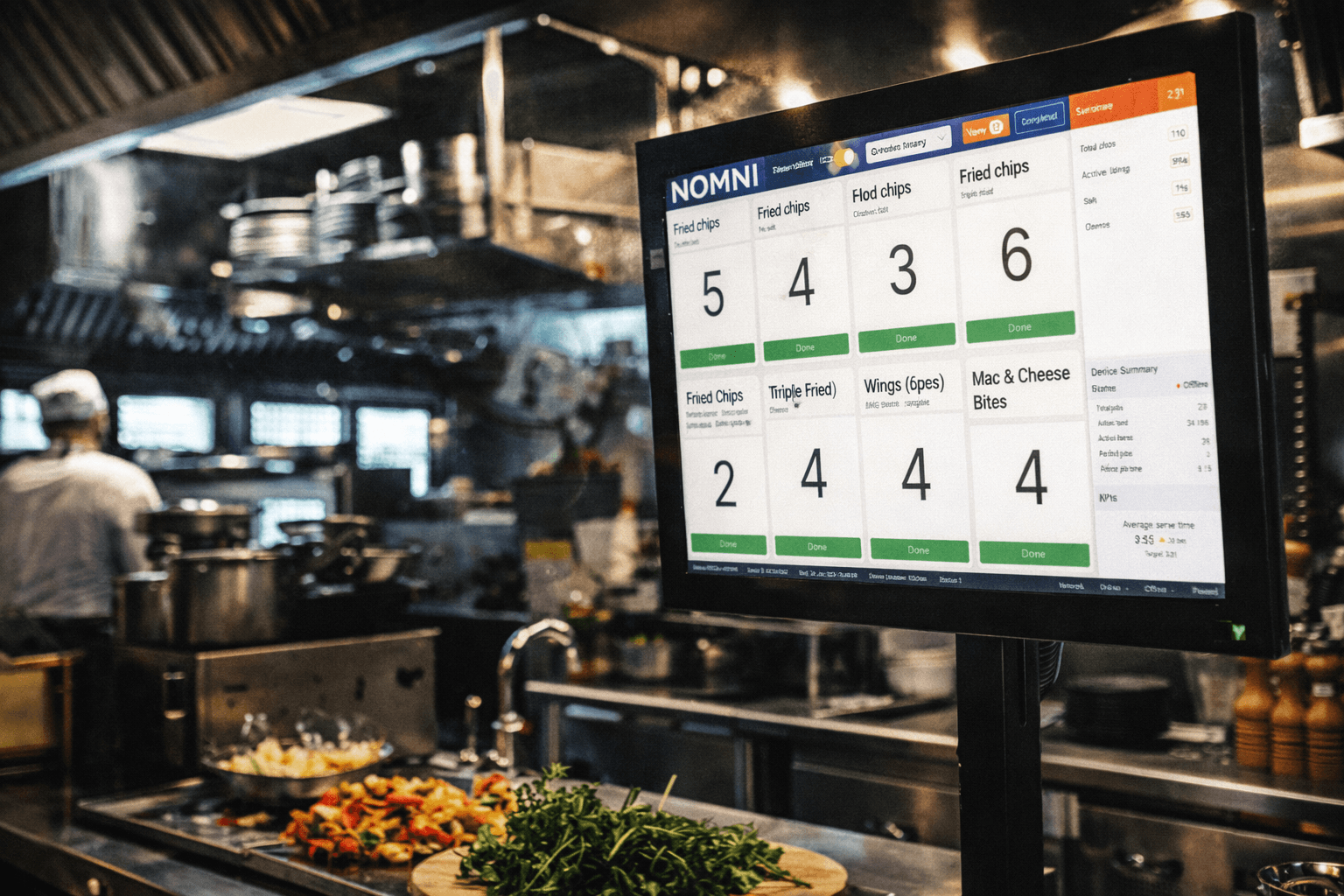
Moving to a digital Kitchen Display System replaces manual ticket handling with real-time order visibility. Orders flow directly from Nomni POS and digital ordering channels to kitchen screens, removing double handling and miscommunication.
Digitising your kitchen creates clearer station workflows, better tracking of order progress and improved service consistency during peak periods.
Why Go Digital in the Kitchen?
Digitising your kitchen workflow reduces pressure on staff and improves service consistency. A connected Kitchen Display System introduces structured order handling across stations.
Real-Time KDS Updates: Orders from counter service, table ordering or online channels appear instantly on kitchen screens. There is no need for printed dockets or manual handoffs between the front and back of house.
Eliminate Lost Tickets and Manual Errors: Digital order tracking removes the risk of misplaced dockets, duplicate preparation or missed items during peak periods.
Clear Front-and-Back-of-House Coordination: All stations view the same live information, reducing verbal callouts and manual cross-checking.
Structured Order Routing: Orders can be split by station, tracked as they are completed and displayed with full item details and modifiers.
Improved Speed and Accuracy: Kitchen staff can see what needs to be prepared, in what quantity and in what sequence, supporting faster and more accurate execution.
What Tools Do You Need?
Kitchen Display System (KDS): A kitchen screen that replaces printed dockets and displays live, synchronised orders from all ordering channels.
Multi-Station KDS Workflows: Designed for larger kitchens or venues with separate prep areas. Orders are automatically routed to the appropriate station, such as grill, salad or dessert, so each team sees only the items relevant to their workflow.
POS Integration: Nomni POS and KDS operate as one system. Orders from dine-in, takeaway, online, catering and table ordering flow directly to the kitchen without manual intervention.
Captain’s Station Display: A centralised screen for food runners or pass stations. It shows completed items across all kitchen stations, enabling front-of-house teams to identify ready orders without interrupting kitchen staff.
Get in touch, and we’ll set you up.
Nomni brings kitchen digitalisation into one connected system.
KDS, POS and workflow management operate within a single platform, with data flowing directly between front and back of house. There is no need for third-party integrations or complex configuration.
This structure enables faster implementation and consistent performance from day one. Ready to get started? Get in touch, and we’ll set you up.
What Does It Look Like in Practice?
Here is how a digitised kitchen workflow operates within Nomni.
Order Placed → Instantly Displayed on KDS
When an order is placed at the counter, table or online, it appears immediately on the Kitchen Display System. Product grouping batches similar items automatically, while real-time quantity tracking provides visibility into the current workload.Orders Routed to the Correct Station
Each component of the order is directed to the appropriate kitchen station, such as grill, fryer or salad. Intelligent routing distributes workload evenly and prevents duplication across screens.Items Marked Complete → Workflow Updates
When a dish is prepared, staff tap to mark it as complete. The update reflects instantly across the system, advancing the order without manual communication.Front of House Receives Live Updates
Completed items appear on the Captain’s Station Display. Front-of-house staff can see which orders are ready to serve without interrupting kitchen operations.
Ready to digitise your kitchen? Get in touch for help with the setup!
Still operating your kitchen on paper tickets? A digitised kitchen workflow can improve back-of-house performance by increasing speed, reducing errors and improving team coordination.
Moving to a digital Kitchen Display System replaces manual ticket handling with real-time order visibility. Orders flow directly from Nomni POS and digital ordering channels to kitchen screens, removing double handling and miscommunication.
Digitising your kitchen creates clearer station workflows, better tracking of order progress and improved service consistency during peak periods.
Why Go Digital in the Kitchen?
Digitising your kitchen workflow reduces pressure on staff and improves service consistency. A connected Kitchen Display System introduces structured order handling across stations.
Real-Time KDS Updates: Orders from counter service, table ordering or online channels appear instantly on kitchen screens. There is no need for printed dockets or manual handoffs between the front and back of house.
Eliminate Lost Tickets and Manual Errors: Digital order tracking removes the risk of misplaced dockets, duplicate preparation or missed items during peak periods.
Clear Front-and-Back-of-House Coordination: All stations view the same live information, reducing verbal callouts and manual cross-checking.
Structured Order Routing: Orders can be split by station, tracked as they are completed and displayed with full item details and modifiers.
Improved Speed and Accuracy: Kitchen staff can see what needs to be prepared, in what quantity and in what sequence, supporting faster and more accurate execution.
What Tools Do You Need?
Kitchen Display System (KDS): A kitchen screen that replaces printed dockets and displays live, synchronised orders from all ordering channels.
Multi-Station KDS Workflows: Designed for larger kitchens or venues with separate prep areas. Orders are automatically routed to the appropriate station, such as grill, salad or dessert, so each team sees only the items relevant to their workflow.
POS Integration: Nomni POS and KDS operate as one system. Orders from dine-in, takeaway, online, catering and table ordering flow directly to the kitchen without manual intervention.
Captain’s Station Display: A centralised screen for food runners or pass stations. It shows completed items across all kitchen stations, enabling front-of-house teams to identify ready orders without interrupting kitchen staff.
Get in touch, and we’ll set you up.
Nomni brings kitchen digitalisation into one connected system.
KDS, POS and workflow management operate within a single platform, with data flowing directly between front and back of house. There is no need for third-party integrations or complex configuration.
This structure enables faster implementation and consistent performance from day one. Ready to get started? Get in touch, and we’ll set you up.
What Does It Look Like in Practice?
Here is how a digitised kitchen workflow operates within Nomni.
Order Placed → Instantly Displayed on KDS
When an order is placed at the counter, table or online, it appears immediately on the Kitchen Display System. Product grouping batches similar items automatically, while real-time quantity tracking provides visibility into the current workload.Orders Routed to the Correct Station
Each component of the order is directed to the appropriate kitchen station, such as grill, fryer or salad. Intelligent routing distributes workload evenly and prevents duplication across screens.Items Marked Complete → Workflow Updates
When a dish is prepared, staff tap to mark it as complete. The update reflects instantly across the system, advancing the order without manual communication.Front of House Receives Live Updates
Completed items appear on the Captain’s Station Display. Front-of-house staff can see which orders are ready to serve without interrupting kitchen operations.
Ready to digitise your kitchen? Get in touch for help with the setup!
Nomni is the first complete hospitality system that works for you. Loved by over 35,000 venues across Asia Pacific and used by tens of millions of diners and operators annually. To see how Nomni can work for you, visit Nomni.ai
Nomni is the first complete hospitality system that works for you. Loved by over 35,000 venues across Asia Pacific and used by tens of millions of diners and operators annually. To see how Nomni can work for you, visit Nomni.ai
Share this post
Share this post
You might also like
You might also like
You might also like
Browse by category
Browse by category
End not knowing!
Get industry insights, guides, best practices from the best operators, sneak previews of new technology, and more!
End not knowing!
Get industry insights, guides, best practices from the best operators, sneak previews of new technology, and more!
End not knowing!
Get industry insights, guides, best practices from the best operators, sneak previews of new technology, and more!